How to Cancel a DramaBox Subscription (iOS, Android and Web)
- DramaBox subscriptions must be cancelled through the store you subscribed on — the app itself has no cancel button.
- iOS: Settings → your name → Subscriptions → select DramaBox → Cancel Subscription.
- Android: Play Store → profile icon → Payments & subscriptions → Subscriptions → DramaBox → Cancel.
- The price almost certainly changes at renewal: DramaBox charges $9.99/week for three weeks, then $12.99/week. Read the renewal figure off before you confirm anything.
- Coins are a one-off purchase with nothing to cancel — and DramaBox spends your free reward coins before your paid ones.
- After cancelling, the subscription stays in the list but shows an access-until date instead of a billing date.
- Access normally continues until the end of the period you already paid for.
Read this before you cancel: the price changes at renewal
DramaBox cancellation is the same two-minute job it is on every app store. The part that catches people is not the mechanics — it is what they are cancelling into. The introductory price is not the renewal price, and on this app the gap is large enough to be the whole reason you are cancelling.
Weekly Membership is listed at $9.99 a week for the first three weeks, shown in the app as 23% off $12.99 and carrying a 24-hour countdown. After the three weeks it renews at $12.99 a week — 23% higher than the price you agreed to. If you signed up during a promotional week and then quietly watched it roll over, the number that charged you was not the number on screen when you tapped subscribe.
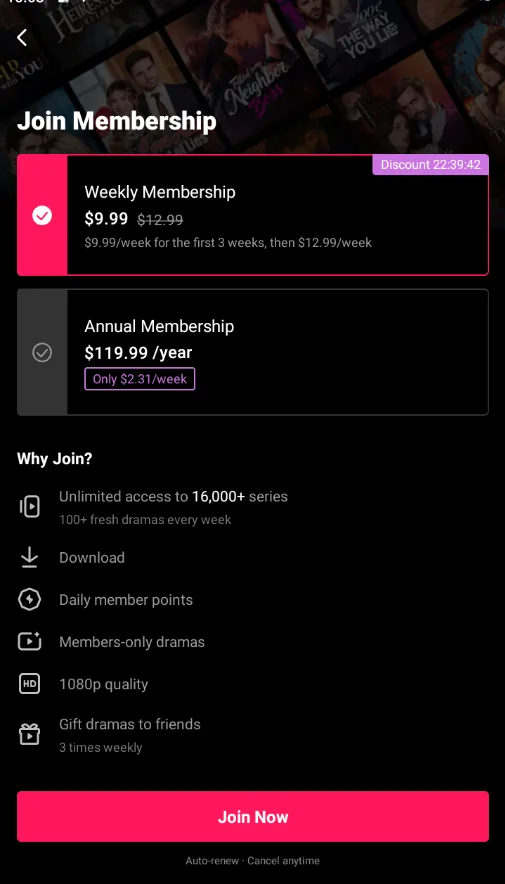
So before you tap anything, open your store’s subscription list and read the renewal amount on the DramaBox entry. That figure — not the promotional price — is what your money situation actually looks like from here.
A cancelled subscription costs you nothing further, but a subscription you leave running at full rate costs you $12.99 a week — roughly $529 a year, for a week of bingeing you have already watched. If your reason for cancelling is cost, this is the number to do the arithmetic on. Our DramaBox cost breakdown works out where membership starts making financial sense against the coin route, which is a different question from whether you can stop the renewal.
Why there is no cancel button inside DramaBox
This is not a trick and it is not a dark pattern unique to DramaBox. When you subscribe through the Apple App Store or Google Play, the store takes the payment and holds the renewal instruction. The app is a tenant of that system, not the landlord, so it genuinely cannot cancel the subscription for you.
DramaBox is unusually direct about this. The help text on its in-app store page states that renewal is handled by Google Play, that Google Play charges automatically within 24 hours of expiry, and that cancellation is managed in Google Play subscriptions. That is the app telling you where the control lives rather than hiding it.
Deleting the app cancels nothing — the subscription survives and
keeps renewing.
Signing out cancels nothing either, for the same reason.
Cancelling a payment method is not a cancellation; it can leave
you in a failed-payment loop while the subscription is still live.
Delete-and-reinstall is the single most common route to a surprise charge, and it is the one people are most confident about because the app really does disappear. It disappears; the billing does not.
Cancel on iPhone or iPad
Open Settings — the system Settings app on your device, not the App Store.
Tap your name at the top. If it is not there, tap “Sign in to your iPhone” first; the subscription list only appears for a signed-in Apple ID.
Tap Subscriptions. This lists every active and recently expired subscription on the account.
Select DramaBox. If it is missing, you subscribed with a different Apple ID — a common issue on shared family devices.
Check the renewal price on the detail screen before you commit to anything. On a discounted week this is where the jump from $9.99 to $12.99 is visible.
Tap Cancel Subscription. Apple will offer a retention prompt with an alternative offer; continuing to cancel is fine, it does not block you.
We tested this flow end to end on Android, with screenshots. For iOS we had no device to capture, so the steps above follow Apple’s own published cancellation documentation — we would rather say that than show you a picture we cannot stand behind. The screen names are exactly as Apple labels them.
Cancel on Android
Open the Google Play Store and tap your profile icon in the top right.
Open “Payments & subscriptions”, then “Subscriptions”. This is the authoritative list of what will renew.
Select DramaBox and read the subscription detail page before tapping anything — it shows the exact renewal amount.
Tap Cancel subscription and work through the confirmation screens, which usually include a retention offer.
Screenshot the confirmation. It is the fastest evidence to have if a charge still appears.
This is what a Google Play subscription confirmation looks like in practice, and the price jump is printed in plain sight. The line marked “Today · 1-week period” is the discounted first period. Beneath it, “Starting Oct 16, 2026” is what you will actually pay from then on: $24.99 a week against the $15.99 you agreed to.
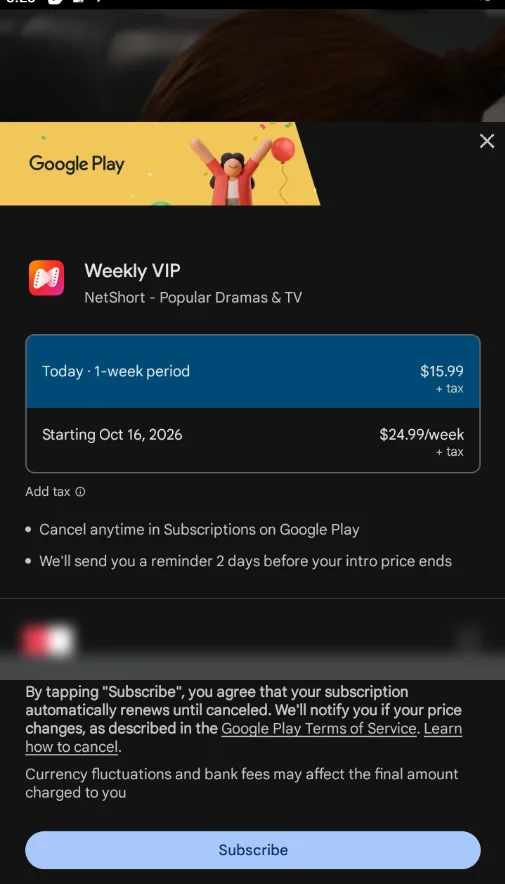
The app name differs from ours, but the store screen does not — the subscription confirmation, the renewal line and the cancellation terms are Google’s own, identical across every app sold through Play. It is also the clearest example of the pattern DramaBox uses: a discounted first period that quietly becomes the standard rate.
Note the two lines in the middle of that screenshot, in the store’s own language: “Cancel anytime in Subscriptions on Google Play” and “We’ll send you a reminder 2 days before your intro price ends.” You do get warning. It is two days though, and people who subscribe on a discount routinely treat that as the end of it rather than the start. If you subscribed on a promotional rate, act on the reminder.
Cancel if you subscribed on the web
If you subscribed through the desktop web player, neither app store holds the subscription and neither store’s list will show it. The cancellation route is wherever you entered payment details — the account or billing page in a browser.
Worth checking specifically, because a web subscription is easy to forget: it will not appear in the store settings you are used to checking. If you are unsure which route you used, our DramaBox legitimacy check explains who processes which payment.
The same DramaBox account showed us Japanese yen through one connection and US dollars through another, on consecutive days. The app says as much itself: “the current product prices are displayed in USD. Please restart DramaBox to refresh the localized pricing.” So a cancellation you make from a different region, or a renewal processed while you are connected elsewhere, may not be handling the same price you think it is. Check the currency on the receipt.
Confirm it actually worked
Do not stop at the confirmation screen. Do this:
- Re-open the subscription list in the same place you cancelled from.
Confirm the billing date is gone, or that the entry has moved into an expired section.
Check the date it now shows. Access normally continues until the end of the period you already paid for, then ends.
- Keep the screenshot until after that access-until date has passed.
The entry does not disappear after cancelling — that is normal and not a sign of failure. A live subscription shows a next billing date; a cancelled one shows an access-until date instead. If a future billing date is still there, the cancellation did not go through, and you should check your email for a store confirmation. That email is the only reliable receipt — keep it.
Coins: there is nothing to cancel
Coin packs in DramaBox are one-off purchases, not subscriptions. If you bought a pack there is no recurring charge to stop, and nothing in your store subscription list will ever mention it.
One rule matters here that is specific to this app: DramaBox spends your reward coins first when you unlock an episode, as stated on the in-app store page. The coins you earned from check-ins, video tasks and sign-up bonuses are consumed before the coins you paid for. Practical consequences: your free balance is not quietly expired by buying early, and a refund request on spent coins is unlikely to succeed because part of what you spent was never paid for. If you are weighing whether to cancel or just stop subscribing, our free coins breakdown shows what the free tier covers on its own.
Any coin balance stays attached to your account if you cancel — cancelling a subscription does not delete the balance. If you resubscribe later, the coins are still there.
If you were already charged
Cancelling stops future renewals. It does not refund a charge that already went through, and it is not automatic.
Go to the store’s refund route first. On iOS that is the Apple “Report a Problem” flow; on Android it is the Play Store refund request. These are the parties that processed the payment and they control the outcome.
Cancel the subscription as well, so the refund request and the renewal stop are both in place.
Be specific about the timeline — when you cancelled, when the charge appeared, and what you were shown when you subscribed. If the price you were shown differed from what was charged, say so: that gap is the substance of the complaint.
Contacting the app publisher is usually the slower path, because they cannot issue refunds for store-processed payments. Use the store route first. The wider pattern — why these prices move, and what to check before the first payment rather than after the renewal — is in how the subscription trap works.
What cancelling does not do
It does not refund the current period. You keep access until the period ends and you do not get that money back. For what a period actually costs, see the price breakdown.
It does not delete your account or your coin balance. Remaining coins stay on the account, so nothing is lost if you come back.
It does not stop member points. It stops them. DramaBox states that points are for paid members only, so cancelling ends your accrual — one of the few places on these apps where leaving genuinely costs you something.
It does not work retroactively. If the renewal already processed, you are in refund territory, not cancellation territory.
It does not cover a subscription on a different account. If DramaBox is absent from your list, check the other Apple ID or Google account on the device before concluding there is nothing to cancel.
If cancelling is not the goal and you would rather keep paying less, that is a solvable problem too — the stop paying more than you need to playbook covers choosing the payment shape deliberately, across apps.
Bottom line
DramaBox subscriptions cancel in the store that holds them — Google Play or the App Store — not in the app, and not by deleting the app. Read the renewal price before you confirm anything, because $9.99 for three weeks becomes $12.99 every week after that. Then go back and check that the billing date is gone and an access-until date has replaced it.
Frequently asked questions
Why can I not find a cancel button in the DramaBox app?
Because the app usually did not sell you the subscription. When you subscribe through the Apple App Store or Google Play, the store handles the payment and holds the renewal, so the only control that stops it lives in your store account settings. On Android, DramaBox says this itself in the app: cancellation is managed in Google Play subscriptions.
How much will I be charged when my DramaBox subscription renews?
Most likely more than you paid at the start. DramaBox lists Weekly Membership at $9.99 per week for the first three weeks — shown as 23% off $12.99 — and renews at $12.99 per week after that. If you subscribed during a discounted week, the amount your store shows as the renewal rate is the number that will be charged.
Do I get a refund if I cancel immediately?
Normally no. Cancelling stops the next renewal and your access continues until the end of the period you already paid for. A refund is a separate request through the app store, not an automatic result of cancelling.
I cancelled but got charged again — what went wrong?
The two usual causes are cancelling in the wrong place (deleting the app, or signing out, cancels nothing) or cancelling after the renewal had already been processed. Open your store subscription list and check whether a future billing date is still shown. If it is, the cancellation did not register and you should run the steps again.
Does cancelling DramaBox delete my account or my coins?
No. Cancelling a subscription does not delete your account and your coin balance stays attached to it. You also lose access to member benefits — DramaBox member points can only be earned by paying members, so they stop accruing once the subscription ends.
Can I cancel DramaBox coins and get my money back?
Coins are a one-off purchase rather than a subscription, so there is nothing to cancel. Refunds on spent coins go through the app store refund process and are handled case by case, with no guarantee.
This guide covers one question about DramaBox. For pricing, the free tier and what it is actually like to use, see our DramaBox full review.