The Short Drama App Subscription Trap: How the Renewal Loop Actually Works
- The trap is not the sticker price. It is the renewal loop: a discounted intro week, a renewal rate up to three times higher, and a charge that lands 24 hours before each period ends.
- Intro pricing rotates by day and account. The same plan showed 67% off one day and 21% off the next on the account we tested — so any "official price" you read anywhere is a snapshot.
- The cheapest coin packs are often hidden behind the episode paywall instead of on the store page, so the first price you see is not the cheapest one available.
- Independent review data completes the picture: store ratings of 4.7 and 3.8 versus 1.3 on Trustpilot, where the most common complaint theme is unexpected payment and cancelled-too-late renewals.
- The exit is unglamorous: cancel in your phone's subscription settings, set a reminder two days after subscribing, and decide your volume before you open the store page.
The anatomy of the trap
Nobody searches for “subscription trap” because a price felt high. The price of an episode on these apps is roughly what a vending machine charges. People search for it because they looked at their bank statement and found a charge they did not remember approving, at a number they do not remember seeing.
That experience is manufactured, and it is worth taking apart — because once you can name the four parts, you stop being the target market.
Everything below comes from two of the largest apps, tested on Android with a US account in October 2026, with screenshots taken at each step.
Part 1: intro prices that rotate daily
The first thing a new account sees is a discounted subscription with a countdown — usually 24 hours, so the discount feels like it will disappear.
Here is what the same device, same account, showed on two consecutive days:
- Day one: weekly VIP at $1.99, labelled 67% off, renewing at $5.99/week
- Day two: the same plan at $15.99 for the first week, labelled 21% off, renewing at $19.99/week
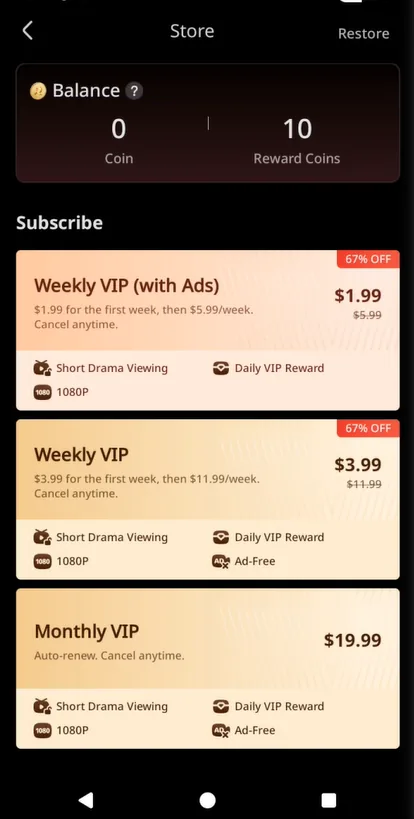
The lesson is not that the app is broken. The lesson is that any published “official price” for these apps — including on this site — is a dated snapshot. The discount percentage, the intro price, and sometimes the plan lineup itself change per day and per account. When a renewal lands at a number you do not recognise, this is usually why.
Part 2: the cheaper packs are hidden
The store page shows a coin section with packs starting around $9.99–$19.99. Open a locked episode instead, and the same store reveals packs it did not show before — including a $4.99 starter pack that was invisible from the main store screen.
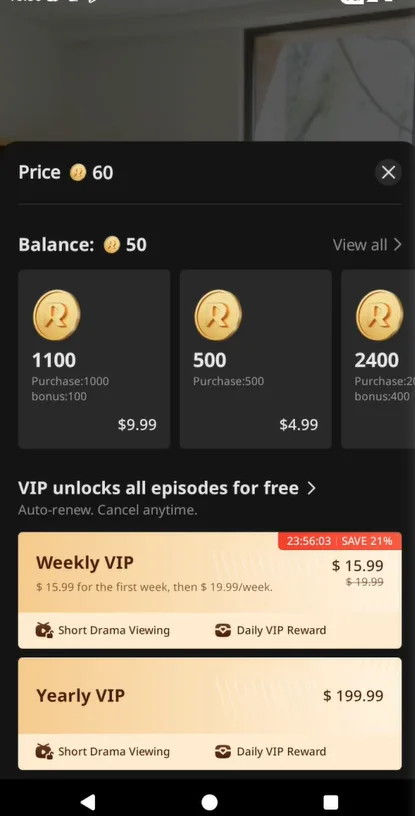
Same prices, same app, same day — different entry point. The design effect is subtle: a user buying from the store page pays more per coin than a user who went looking from the paywall. Nothing is hidden dishonestly, exactly. It is just that the cheap option requires knowing it exists.
Never buy coins from the store page without first opening a locked episode and checking the packs offered there. On both apps we tested, the paywall route exposed cheaper tiers.
Part 3: the renewal terms you confirm at midnight
The confirmation screen is where the model converts. It is also where nobody looks, because the confirmation arrives at the exact moment you are trying to watch the next episode of a cliffhanger.
What it actually says, on the account we tested:
- The renewal charge lands from a specific date, 24 hours before each new period begins, at the renewal rate — not the intro rate
- All prices are plus tax
- Cancellation lives in Google Play’s subscription settings, not the app
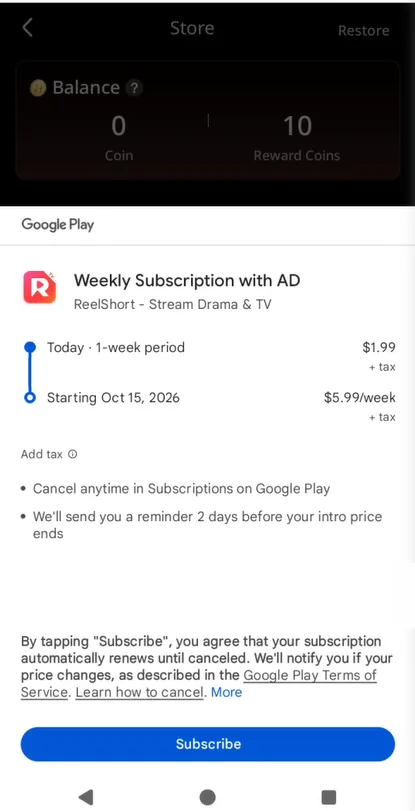
Notice what is not here: there is no reminder before renewal, no usage-based pause, no “are you still watching” check. The subscription continues on the assumption that you have forgotten it, and the numbers we found in independent review data suggest many people have.
Part 4: what the complaint data says
The strongest evidence for the trap being structural rather than anecdotal is the gap between rating ecosystems. On the same app:
- App Store: 4.7 out of 5, from about 506,000 ratings
- Google Play: 3.8, from about 1.9 million reviews
- Trustpilot: 1.3 out of 5 — “Bad” — from 265 reviews, on a profile the company has not claimed
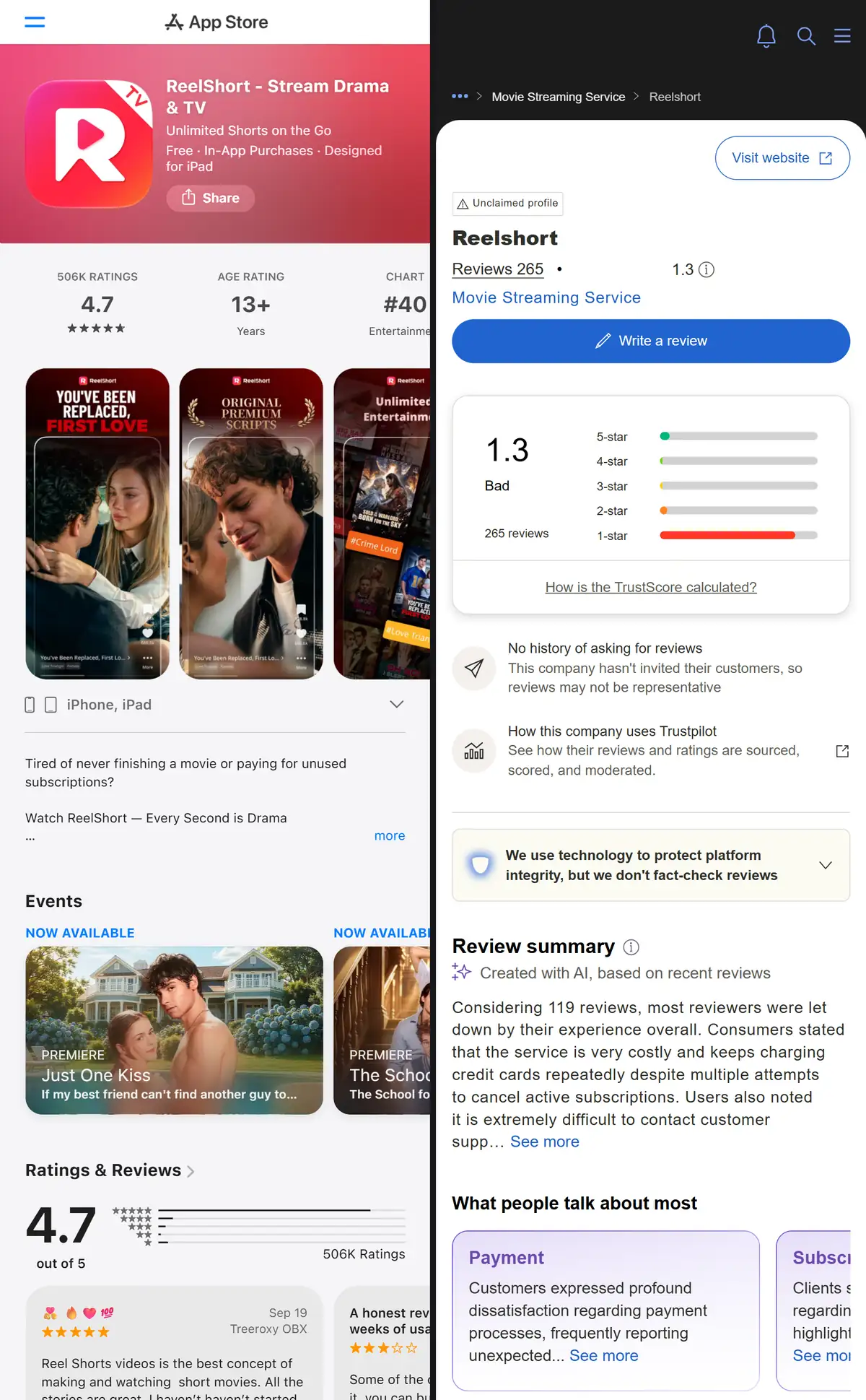
The complaint themes on the independent site are not about story quality or buffering. The top topic is payment: repeated charges, subscriptions that survived attempted cancellation, and difficulty reaching support. That is the renewal loop, described by the people it caught.
How to opt out deliberately
The exit is the same whether or not you intend to keep watching:
Cancel now, in your phone’s settings. Google Play → Payments & subscriptions, or iOS Settings → Subscriptions. You keep access to the end of the paid period, and coins you bought stay on your balance. See the step-by-step cancellation guide.
Check for stray charges. Look at the last two billing cycles. Charges from these apps often hide under the developer’s name rather than the app’s, which is a large part of why people miss them.
Refund recent mistakes through the store, not the app. Google Play self-service refunds and Apple’s reportaproblem page both work for recent charges and are faster than app support.
If you keep watching, choose the shape first. Coins below two series a month, a single cancelled-on-time week per binge, or an annual plan above that. The arithmetic is in our stop-paying playbook.
Limits of this analysis
- Two apps, one platform, October 2026. We tested ReelShort and DramaBox on Android with a US account. iOS pricing and smaller apps may behave differently, and every specific number here is a dated snapshot by design.
- We cannot see anyone’s account but our own. The rotating-discount finding comes from one device over two days. It is consistent with the countdown mechanics visible in the app, but individual experiences will vary.
- Trustpilot samples are self-selected. 265 reviews skews negative by nature — people with no problem rarely write reviews. The signal is the theme of the complaints (payment, cancellation, support), not the score itself.
- This page is not legal advice and not an accusation of fraud. Every mechanism described is disclosed on a screen the user confirms. The point is that the disclosure is easy to miss, and knowing where it lives changes what you pay.
Bottom line
The subscription trap in short drama apps is a renewal loop, not a hidden fee: intro prices that rotate daily, renewal rates up to three times higher, a charge that lands 24 hours before each period ends, and cheaper coin packs kept off the main store page. None of it is hidden from someone who knows where to look — which is the point of knowing where to look.
Frequently asked questions
Are short drama subscription apps a scam?
Not in the fraud sense — the content exists and the prices are disclosed before you confirm. But the design leans hard on friction and urgency: intro discounts that rotate daily, renewal rates up to three times the intro price, billing 24 hours before each period ends, and the cheapest coin packs kept off the main store page. It is a legal model that profits from inattention, which is why the cancellation mechanics matter more than the price list.
Why was I charged more than the price I signed up at?
Two common reasons. First, the intro price was a first-period discount and the renewal rate is higher — weekly plans we observed renewed at $5.99 to $19.99 after discounted first weeks. Second, tax is added on top of the listed price at checkout. Both are on the confirmation screen, which is easy to skim past at the moment you are trying to watch the next episode.
Can I get a refund on a short drama subscription?
On Android, request it through Google Play's purchase history — self-service refunds are usually granted for recent charges on an account with a clean history. On iOS, use reportaproblem.apple.com. The apps' own support channels are consistently the slowest path, and independent review sites are full of complaints about exactly that.
How do I stop the charges without losing what I paid for?
Cancel in Google Play or the App Store subscription list. Cancelling stops future charges and keeps your access until the current period ends. Coins you bought stay in your balance. See our step-by-step cancellation guide for the exact screens.