Short Drama App Cancellation Refund: How to Get Your Money Back
- Cancelling stops future renewals. It does not refund anything already paid. A refund is a separate request to the store that took your money.
- Google Play allows a refund request for apps and in-app purchases within 48 hours of purchase. After that, Play's own policy says to take it up with the developer.
- Apple has no 48-hour rule. You report the problem at reportaproblem.apple.com and each case is decided on its merits, which can work well outside 48 hours — particularly for charges you did not authorise
- Each app can only be refunded once. Re-buying after a refund forfeits the eligibility for that app.
- Coins are the hard case: refund requests on spent coins are usually refused, and DramaBox spends your reward coins before your paid ones, which weakens the claim further.
- The strongest thing you can put in a request is a specific timeline — when the charge landed, when you tried to cancel, and what price you were shown versus what was taken.
Cancelling is not refunding
These are two different requests that people treat as one, and confusing them wastes the single window you have to act.
| Cancel | Refund | |
|---|---|---|
| What it does | Stops the next renewal | Returns money already paid |
| Who handles it | The app store | The app store |
| Time limit | None — but do it before renewal | Google Play: 48 hours |
| Effect on access | Continues until the period ends | Access is removed if granted |
| Can be refused? | Rarely | Frequently |
If you only want to stop paying, cancelling is enough and much easier. If you want your money back, you have to ask separately — and the timing matters in a way that surprises people.
A subscription renewal is a new transaction as far as Play is concerned. In practice that means a renewal charge you did not expect may be well past the window, while a subscription you bought this morning is inside it.
The refund windows, platform by platform
The two stores have genuinely different rules, and the difference is larger than most people expect.
| Platform | Window | How it is handled |
|---|---|---|
| Google Play | 48 hours from purchase | Formal request; decision usually within 1 business day, up to 4 |
| Apple | No fixed window | Case-by-case review at reportaproblem.apple.com |
Google’s own policy text is blunt about what happens after 48 hours: “After 48 hours: contact the developer to troubleshoot and see if you can get a refund under their policies and applicable laws.” In practice that means Play’s easy path closes and you are negotiating with the publisher — which is exactly the part these apps are worst at.
Apple has no equivalent deadline, so an unauthorised charge can be reported months later. That asymmetry is real and worth knowing before you choose which platform to buy on.
Google Play states that each app can only be refunded once — and if you re-buy the same app afterwards, you forfeit that eligibility entirely. It also says multi-item purchases can only be refunded in full, not item by item, so buying three coin packs in one transaction means all three or nothing.
Requesting on Google Play
Open the Play Store and tap your profile icon.
Payments & subscriptions → Budget & history (sometimes labelled Order history).
Find the specific transaction. If it was within the last couple of hours you will see a Refund option inline; older purchases go through Play’s refund workflow instead.
State the reason plainly — this is the part that matters, covered in detail below.
Submit, then wait. A refund request cannot be withdrawn once sent. Most decisions land within one business day, but it can be four.
Play itself says that if a refund is denied you can try approaching the app developer. There is a section on that below, and it is worth more effort than most people assume — particularly where the charge came after a cancellation you genuinely made.
Requesting on Apple
Apple has no self-service refund button. The route is the same one people use for any App Store charge:
Go to
reportaproblem.apple.comand sign in with the Apple ID that made the purchase.Select the subscription — it appears under your purchases if it is still active.
Choose “I’d like to request a refund” and describe the problem.
Submit. Apple reviews these by hand and reports back by email, with no published time limit.
Two Apple-specific advantages worth using: Apple reviews unauthorised charges seriously, and it does not impose Play’s once-per-app limit, so a prior refusal does not necessarily close the door.
What usually gets refused
From what the platforms publish and what the complaints in this category actually describe, these are the requests that fail most often:
Anything past 48 hours on Google Play. The window is short, and Play’s own text routes you elsewhere afterwards.
A second refund on the same app. Explicitly disallowed.
Coins you have already spent. See below — this one has a specific complication on DramaBox.
A renewal processed after you cancelled. This reads as a valid subscription charge unless you can show the cancellation happened first. If you cancelled in the wrong place — deleted the app, or signed out — the store has no record of any attempt, and this becomes hard to argue.
Part of a multi-item transaction. Not possible; the transaction refunds whole or not at all.
Changing your mind after using the content. Play’s grounds for refunding an app purchase shortly after buying are about the purchase, not about satisfaction.
If you cancelled correctly — in the store, before the renewal — and were still charged, that is the strongest claim available. It is not a policy grey area: you have evidence the subscription should not have renewed. Keep the cancellation confirmation and the charge notification side by side.
Why coin purchases are the hard case
Coins are a one-off purchase rather than a subscription, so there is nothing to cancel — and once spent, the request becomes a request to return consumable content you have already used.
There is an extra wrinkle on DramaBox specifically. Its in-app help text states that reward coins are spent first when you unlock an episode — the coins you collected from check-ins, video tasks and sign-up bonuses are consumed before the coins you paid for.
If your balance contained both free and paid coins and you spent coins, the app can point out that part of what you spent was never paid for. That does not make the request invalid, but it removes the clean argument that “I never used what I bought” — and that argument is what usually carries a small partial request.
The practical implication: buy the smallest pack that covers what you actually need. Our ReelShort per-episode breakdown shows why the smallest pack costs 50% more per episode, which is an expensive habit if the purchase later becomes refundable — it is not.
What to write in the request
Requests are read by people, and the difference between a vague complaint and a specific one is often the difference between a refusal and a refund. Four things to include:
The dates. When the charge landed, and when you first tried to cancel. Order matters: cancellation before the charge is the whole argument.
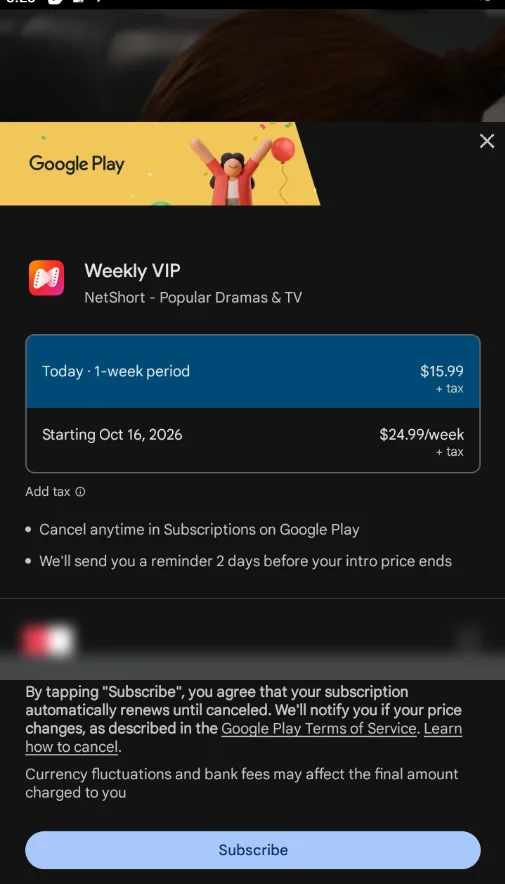
The price you were shown against the price taken. If the renewal was $24.99 when the introductory price was $15.99, say both figures. This is objective and checkable.
How you tried to cancel, specifically. “I cancelled in Google Play subscriptions on 14 October and received a confirmation email” is strong. “I tried to cancel the app” is not — it describes the mistake rather than the fact.
What you want. A full refund of the renewal charge, not a vague complaint. Stores respond better to a specific ask.
Resist claiming fraud. If the charge came through Google Play with the correct app name, calling it fraud invites a refusal for mischaracterising the transaction. “I cancelled and was charged again” is both true and far harder to dismiss than “I was scammed”.
If the first request fails
A refusal is not always final, and the escalation routes differ by platform.
On Google Play, Play’s own guidance after a denial is to contact the developer. For an app in this category that means finding a support email in the app and citing the ticket number from your store refund request. Quote the price discrepancy rather than the emotion.
On Apple, you can reply to the case email directly and add evidence — the cancellation confirmation in particular. Apple’s review team handles follow-ups, and a documented timeline is the thing that changes their assessment.
If the money left via a card you do not recognise, that is a different situation entirely: contact your card issuer to dispute it. A genuine in-app purchase shows the store as the merchant. An unfamiliar name is genuinely abnormal and banks handle those differently from merchant refund requests.
How to avoid needing one
Every refund request is a failure that was avoidable. Four habits cover most of it:
Cancel in the store, never in the app. This is the single most important habit on this page. Deleting the app cancels nothing.
Read the renewal amount before you subscribe, not the promotional price. It is displayed in the store subscription screen.
Set a reminder two days before the renewal. Both stores send one before an introductory price ends; treat it as the start of the process rather than the end.
Screenshot the cancellation confirmation and keep it past the access-until date. It is the only evidence that settles a later dispute.
Platform-specific cancellation steps are in the ReelShort guide and the DramaBox guide, and the broader playbook is stopping the renewals altogether.
What this guide cannot promise
We have not submitted a refund ourselves. Everything here comes from the two platforms’ published policies and from what the apps’ own terms say, not from a test claim. Outcome varies by case and neither store publishes an approval rate.
Policies change. The 48-hour window and the once-per-app limit are Google’s current published rules, but they are not contractual and can shift. Check the live policy page before relying on a date.
Subscription-specific windows may differ. Play’s 48-hour rule is written for apps and in-app purchases generally; how it applies to a recurring subscription renewal is exactly the grey area this page is about.
Your rights may exceed Google’s. Depending on where you live, consumer law can be more favourable than the store’s policy. We cannot advise on that — check your local rules.
Bottom line
Cancelling stops the renewal. Refunding is a separate request, and on Google Play you have 48 hours from the purchase to make it. After that, Play’s own policy tells you to take it up with the app.
Apple has no fixed window and reviews by hand, which makes it the more forgiving of the two — particularly for a charge you did not authorise.
So the practical order is: cancel in the store today, then decide whether the money already spent is worth a refund request. If it is, make it within 48 hours on Play, and lead with the dates and the price discrepancy rather than with how annoyed you are. And if you were charged after a cancellation you genuinely made — that is the claim worth pushing, with your confirmation screenshot attached.
Frequently asked questions
Can I get a refund on a short drama app subscription?
Sometimes. Google Play lets you request a refund for apps and in-app purchases within 48 hours of the purchase. Apple has no fixed window and handles each report case by case, so a charge you did not authorise can be refunded well after the fact. Either way, cancelling and refunding are different things — cancelling only stops future renewals and does not return money already spent.
Why was my refund refused?
The most common reasons are that you asked after the 48-hour window on Google Play, that you have already refunded that app once, or that you are asking for coins you have already spent. Play also refuses partial refunds on multi-item transactions. Cancelling after the renewal already processed is a second common cause — at that point the store sees a valid subscription charge, not an error.
How long does a refund take?
On Google Play, most refund decisions arrive within one business day, though it can take up to four. On Apple there is no published standard and it varies by case. In both cases you submit a request and receive an email with the decision — you cannot cancel a refund request once submitted, only wait for the outcome.
Will cancelling give me my money back?
No. Cancelling stops the next renewal and your access continues until the end of the period you already paid for, but that period is not refunded. To get money back you have to make a separate refund request through the store that processed the payment, which is Google Play or Apple — not the app itself.