Short Drama App Guest Account: Lost Subscription After a Phone Change
- **If you paid while signed out, your purchase may belong to a guest account that exists only on that device.** Signing in afterwards can attach you to a different account, and the paid access stays where it was.
- The risk is specific and easy to miss: nothing looks broken at the time. You watch, you pay, the episodes unlock — and the problem only appears when you change phones.
- Changing device is when most people find out. A subscription tied to a local account id does not follow you to a new phone, and there may be no way back.
- The fix takes about a minute and has to happen before you pay, not after: sign in, confirm the email, then make sure the paywall still shows your coins and history.
- If you already paid as a guest, do not uninstall the app and do not clear app data. Those are the two actions most likely to make the guest account unrecoverable.
- This page is written from how these apps are built and from what their own terms say, not from our own experience of losing a subscription — we have not lost one. We have labelled which is which.
Every figure on this page comes from one hands-on session per app, not from a review site. The setup was identical throughout:
- Environment — Android in BlueStacks, real Google Play billing, signed into a US Google Play account so prices rendered in dollars. No VPN region-switching during the pricing pass.
- Deriving the per-episode price — every app prices locked episodes in coins, not dollars. We read the coin cost per episode from the unlock screen, then divided by the coins-per-dollar of a given pack. That is why the same episode shows two prices on our tables: $0.50 is the entry pack, and the lower figure is what the largest pack works out to. Both are real, and which one applies depends on the pack you buy.
- Renewal, not intro — where an app offers a discounted first period, we report the renewal price separately. Intro offers in this category carry countdown timers and rotate by day and by account, so they are treated as marketing, not as the price.
- Confirmed against the store sheet — for every subscription we cross-checked the renewal figure against the Google Play subscription sheet, which is the number that actually reaches the card. Where the in-app text disagreed with the sheet, we report the sheet.
Prices checked in-app on 2026-10-09 · 6 apps in the same session.
Known limits of this method — three things we could not control, stated so you can weigh the numbers: introductory offers rotate daily; DramaBox prices by IP region rather than by account, so a different connection can quote a different currency; and neither app publishes its free/paid boundary, so that figure varies by series and is a measured sample rather than a rule.
We have not lost a subscription this way and cannot claim otherwise. This page is built from how guest purchasing generally works in this category, from what the apps show in their own screens, and from their published terms. We have labelled which claims are our observation and which are mechanics. If you are in this situation right now, the what to do if it already happened section is the one you need.
What the guest-account problem actually is
Several apps in this category let you browse, watch and start a purchase without creating an account. That is convenient — no email, no password, no verification.
The consequence is that a purchase made at that moment has to attach to something, and what it attaches to is a locally stored guest identity on that device. It is not attached to a cloud account, because you never made one.
So there are two accounts that look identical in the app:
- the guest account your purchase sits on, stored locally
- the real account you create when you eventually sign in
They do not merge on their own. If you sign in after paying, you may be looking at a brand-new account with a zero coin balance, no VIP, and no history — while the account you paid for still exists on the old device.
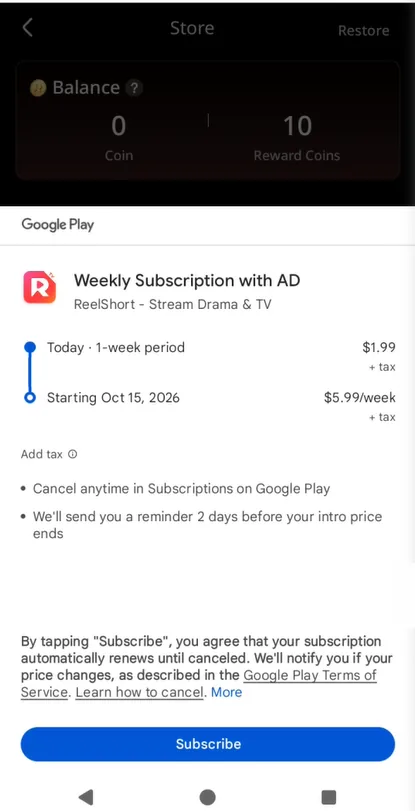
Nothing breaks at the time. You tap pay, the episodes unlock, the app behaves exactly as it should. There is no error message and no warning banner. The problem surfaces weeks or months later, at which point most people blame the app rather than the missing step.
When it usually surfaces
The failure appears at one of these moments:
- you change phone. The guest account does not migrate with the device
- you reinstall the app without restoring from a backup
- you clear app data while troubleshooting something else
- you sign in to “fix” a problem — which creates the second account
- you switch between Apple and Google accounts on a device that had both
The most common one by far is changing phone. Buying a new handset is a normal thing to do, and it is a bad moment to discover that a year of subscription lived on the old handset.
Bind your account before you pay
The whole prevention is one sequence, and the order matters.
Sign in before you buy anything. Create the account and confirm the email address. This is the only step that actually moves your purchases into the cloud.
Open the coin or subscription screen and check the balance. If you have paid before and the balance is empty on a freshly signed-in account, the earlier purchase is on another account — stop and sort that out before paying again.
Note which store account you used. A Google Play purchase and an App Store purchase on the same phone are different subscriptions, even for the same app. This catches people who bought on one store and then changed store account.
Pay from inside the app while signed in, and keep the confirmation. Our page on identifying who billed you explains why that receipt matters later.
Re-check after a phone change. Open the account, confirm the subscription is still there before you assume it transferred.
This takes about a minute and costs nothing. The failure it prevents costs a support ticket, and possibly the purchase itself. That is not a close call.
If you already paid as a guest
If you have already paid without an account, the priority is to not make it worse, then to try recovery.
In order:
- Do not uninstall the app. This is the single most common action that turns a recoverable situation into an unrecovered one.
- Do not clear app data or storage. Same reason — the local guest identity goes with it.
- Sign in inside the app, then look for any option to recover, merge, or transfer a guest purchase to the new account. Some apps offer this; some do not.
- Check the store, not just the app. If the purchase went through Google Play or the App Store, it is recorded there and the store may be able to help even if the app cannot.
- Contact the publisher with three things: the payment reference, the store receipt, and the device the account was created on. That combination is what lets support find a local account.
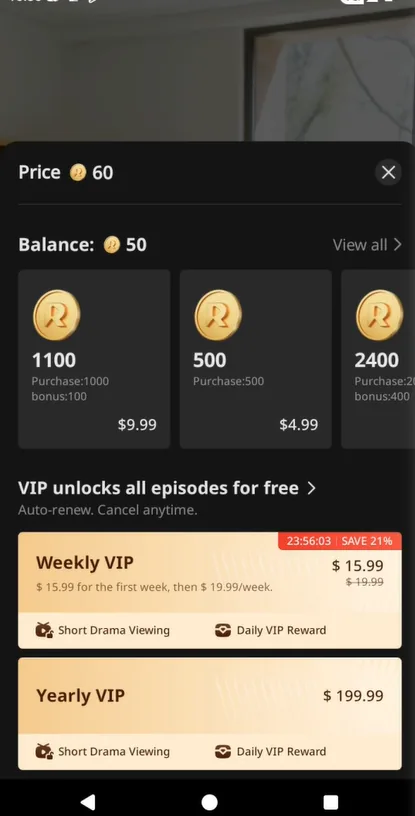
If the purchase was on the app’s own website rather than the store, add the order confirmation to that list. Same three items, different route.
The two things not to do
Almost every report of this going wrong traces back to one of two actions, both taken for entirely reasonable reasons at the time:
- uninstalling the app because it was misbehaving
- clearing app data or storage while troubleshooting
Both are normal things to do. Both destroy local state, and local state is where a guest account lives.
If the app is misbehaving, prefer restarting it, switching accounts, or clearing the Play Store’s cache for that app rather than clearing the app’s own data. And if you must reinstall, take screenshots of anything showing your balance or subscription first.
Keep a record
Two captures, taken while you still have access, are worth taking:
- your account screen, showing the email address that owns the purchases
- your purchase confirmation, showing which account it applied to
Neither takes more than a few seconds, and both answer the only question support will ask first: which account is this on.
Where our testing breaks down
- We have never lost a subscription this way. Every claim above about guest purchasing is either a mechanism we can describe or something the app’s own screens show. We did not test a lost-subscription recovery, because we did not lose one.
- We have not verified guest purchasing on all six apps. Several of them clearly allow browsing and watching without signing in; we did not walk each one through a guest purchase, so treat this as something to check in the app you use rather than a rule that applies to all of them.
- Recovery routes vary and change. Whether an app offers a merge or transfer option is an implementation detail that can change between versions.
- Store-level records may outlive the in-app account. A store receipt is sometimes the only surviving proof, which is one more reason to keep it.
- Prices and purchase flows were current in October 2026. This category changes its flows more often than its branding.
Bottom line
If you pay while signed out, the purchase may belong to an account that exists only on that phone — and nothing will tell you so at the time.
Sign in, confirm the email, check your balance shows, then pay. And if you already paid as a guest, the first thing to do is nothing destructive: no uninstall, no clear data. Those are the actions that end the recovery option.
Frequently asked questions
Can I lose my short drama app subscription if I did not sign in?
It can happen, and the mechanism is that the purchase attaches to whatever account the app had at the time — including an anonymous guest account stored locally on that device. Signing in later may put you on a different account, with a different balance and no access. Nothing looks wrong at the time you pay; the problem usually only appears when you change phone.
I subscribed while signed out and my VIP is gone. What do I do?
Do not uninstall the app and do not clear its app data — either can make a locally stored guest account unrecoverable. First, check whether the app offers a way to sign into your existing guest account or transfer purchases from within the app. If it does not, contact the app publisher with your payment reference, the store receipt, and the device the account was created on. Note that store-billed purchases are also visible in the store, so keep the receipt.
How do I check which account am I paying on?
Before paying, sign in and confirm the email address shown in your profile. Then open the coin or subscription screen and check that your coin balance and any previous purchases are visible while signed in. If the balance is empty on a fresh account even though you have paid before, the earlier purchase is sitting on a different account.
Do short drama apps really let you pay without an account?
Several of them allow browsing and watching without signing in, and payment prompts in those flows can attach to a locally stored guest identity. We have not tested every app in this category for guest purchasing, so treat this as something to check in the app you actually use rather than a universal rule.
Is this worth the effort on a cheap app?
The check itself is about a minute and costs nothing. The asymmetry is the point: one minute now, versus a support ticket and possibly an unrecoverable purchase later.
This guide covers one question about ReelShort. For pricing, the free tier and what it is actually like to use, see our ReelShort full review.