Short Drama App Still Charging After Cancel? Read the Descriptor
- **Start by identifying who took the money, not by cancelling again.** The description on your bank statement tells you which route billed you, and each route has a different cancellation path.
- An Apple charge reads
apple.com/billand a Google Play charge starts withGOOGLEand an asterisk. Anything else was charged by the app company or a payment processor directly — and the name will not necessarily match the app. - This is not a rare edge case for this category. ReelShort runs its own web checkout taking cards, PayPal and bank transfer alongside the in-app store — we verified this on 10 October 2026. A cancellation done inside the app does not touch that subscription.
- Cancelling on the app's own website does not cancel a store-billed subscription either. Users have reported cancelling on the developer's site and still being billed by PayPal.
- Screenshot the cancellation confirmation before you close the app. It is the fastest evidence you can hold if a charge lands after it.
- If a charge is still landing after a confirmed cancellation, that is a chargeback matter, not a settings matter — and the route it should go through depends on who billed you.
Every figure on this page comes from one hands-on session per app, not from a review site. The setup was identical throughout:
- Environment — Android in BlueStacks, real Google Play billing, signed into a US Google Play account so prices rendered in dollars. No VPN region-switching during the pricing pass.
- Deriving the per-episode price — every app prices locked episodes in coins, not dollars. We read the coin cost per episode from the unlock screen, then divided by the coins-per-dollar of a given pack. That is why the same episode shows two prices on our tables: $0.50 is the entry pack, and the lower figure is what the largest pack works out to. Both are real, and which one applies depends on the pack you buy.
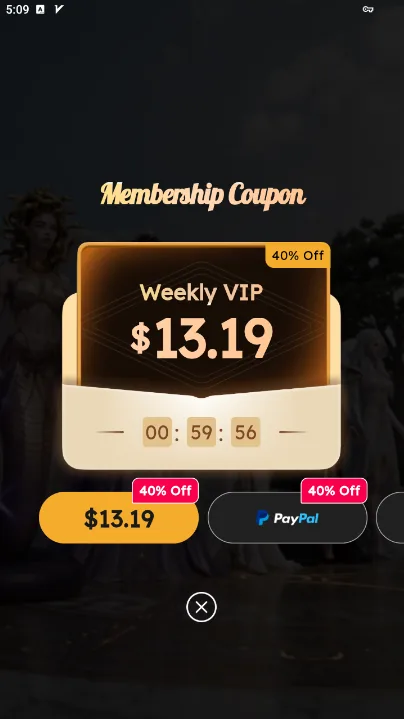
- Renewal, not intro — where an app offers a discounted first period, we report the renewal price separately. Intro offers in this category carry countdown timers and rotate by day and by account, so they are treated as marketing, not as the price.
- Confirmed against the store sheet — for every subscription we cross-checked the renewal figure against the Google Play subscription sheet, which is the number that actually reaches the card. Where the in-app text disagreed with the sheet, we report the sheet.
Prices checked in-app on 2026-10-09 · 6 apps in the same session.
Known limits of this method — three things we could not control, stated so you can weigh the numbers: introductory offers rotate daily; DramaBox prices by IP region rather than by account, so a different connection can quote a different currency; and neither app publishes its free/paid boundary, so that figure varies by series and is a measured sample rather than a rule.
This page is written from what we could verify ourselves — the billing routes these apps actually offer, and one we tested directly. We have not been double-charged ourselves and we cannot claim otherwise. The “reported by users” items below are flagged as such, because presenting someone else’s complaint as our own finding would be exactly the kind of thing this site does not do.
If you have not cancelled yet, our cancellation walkthrough and refund guide cover the steps. This page starts where those end: you cancelled, a charge still appeared, and the first job is to work out who actually took the money — because the fix is different for each billing route.
Step one: find out who billed you
Most failed cancellations are not failed. They are cancellations of the wrong route.
If you subscribed through Google Play and cancelled inside the app, you cancelled the right thing. If you subscribed through the app’s own website and cancelled inside the app, you did not — and no amount of repeating that same action will help.
So the first move is to read the transaction, not the app:
| What the statement shows | Who billed you, and where to fix it |
|---|---|
| apple.com/bill | Apple. Cancel in iOS Settings, then your Apple ID, Subscriptions. The app and the store are linked, so in-app cancellation usually works too |
| GOOGLE* followed by an asterisk, then the publisher name | Google Play. Cancel inside the app or in the Play Store subscription screen. Same arrangement — in-app cancellation should work |
| A company name you do not recognise | The app publisher or a payment processor. Cancel through the publisher website or their support, not through the store. This is the case people get wrong |
| PayPal | PayPal, on behalf of the merchant. Cancel the automatic payment inside PayPal. Nothing you do in the app will stop this |
| The app name itself | The payment processor run by the publisher. Contact the app directly, and expect slower handling than a store refund. |
Prices checked in-app on 2026-10-09.
App publishers in this category frequently bill through a separate legal entity — a regional company, a payment subsidiary, or a processor’s own descriptor. A descriptor that has nothing to do with the app name is common and is not by itself evidence of fraud. What tells you more is whether the charge recurs and whether it matches a subscription you meant to cancel.
The four billing routes and four different fixes
1. Apple App Store. Cancelling in iOS Settings works, and in-app cancelling usually works too because they reach the same subscription. The store is the easiest of the four to deal with.
2. Google Play. Same arrangement. Cancel in the app or through the Play Store. One subtlety worth knowing: Google Play pre-authorises a monthly subscription up to two days before the renewal date, so a pending hold can appear after you cancel — that is the pre-authorisation, not a second live subscription.
3. The app’s own website. This is the one people forget exists. Our ReelShort cancellation guide covers the three routes in detail, and the web checkout is the reason the problem is as common as it is.
4. PayPal. Cancelled entirely inside PayPal. Details below.
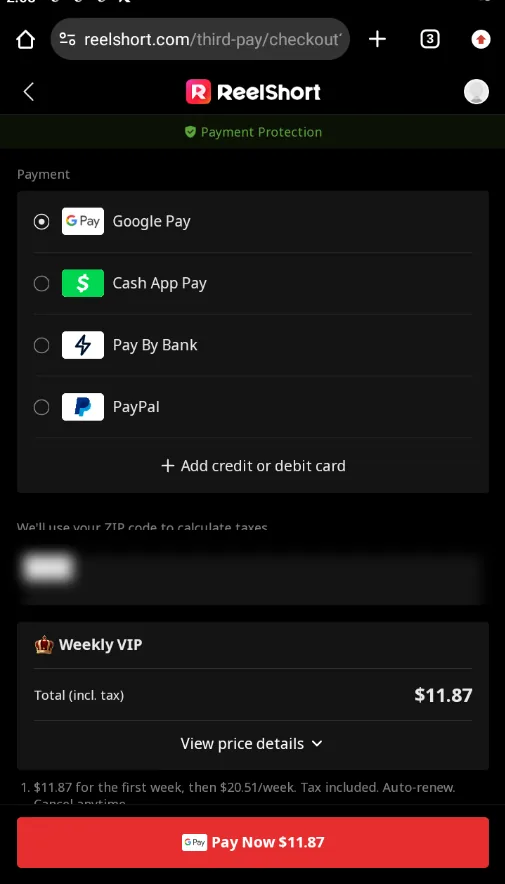
ReelShort runs its own web checkout
This is not unusual for the app; it is what makes the failure mode so common.
We verified on 10 October 2026 that ReelShort runs a web checkout taking cards, Google Pay, PayPal and bank transfer directly, outside the store. A weekly VIP came to $11.87 including tax there.
A subscription bought through that page is invisible to Google Play. So:
- cancelling inside the ReelShort app cancels the Play subscription, not this one
- cancelling at Google Play does not touch it either
- the only route that works is ReelShort’s own site or support
To be clear about the risk: it is a normal payment processor, not a stranger, and the checkout is run by the publisher. The problem is not that it is shady — it is that store subscriptions are cancellable by you, while web subscriptions are cancellable only by the company. That asymmetry is the whole issue.
Find the confirmation email or the order in your card statement, and cancel through ReelShort’s own site or support. Repeating the in-app cancellation will not reach it, and each extra attempt costs you time you may need for the refund.
PayPal is charged outside the app entirely
PayPal needs its own treatment, and the failure mode here is specific: users report cancelling on the app’s own website and still being charged by PayPal.
That is not a bug on either side. The website cancellation and the PayPal authorisation are two separate records. If you signed up through PayPal, the live authorisation sits in your PayPal account, and the developer has no button that can switch it off.
The route that works:
- Log into PayPal
- Settings, then Payments
- Manage automatic payments or Manage saved merchants
- Find the merchant and cancel the authorisation
Do that first if PayPal is the route. It is the one action that reliably stops the charge, and it does not depend on the app company responding to an email.
What to screenshot, and when
Take the screenshot immediately after cancelling, before you close the app. It is the fastest evidence you can hold, and every refund or dispute process downstream will ask for it.
Four things to capture in one go:
- the confirmation that the cancellation went through — the message or the changed subscription state
- the date the access runs until, if shown
- the route you cancelled through (the store screen, or the confirmation email)
- the last charge before the cancellation, from your statement
One detail worth knowing, because it tells you whether a cancellation actually took: the subscription entry does not disappear when you cancel — the date changes. An active subscription shows a next billing date; a cancelled one shows an access-until date. If you still see a future billing date after cancelling, the cancellation did not go through.
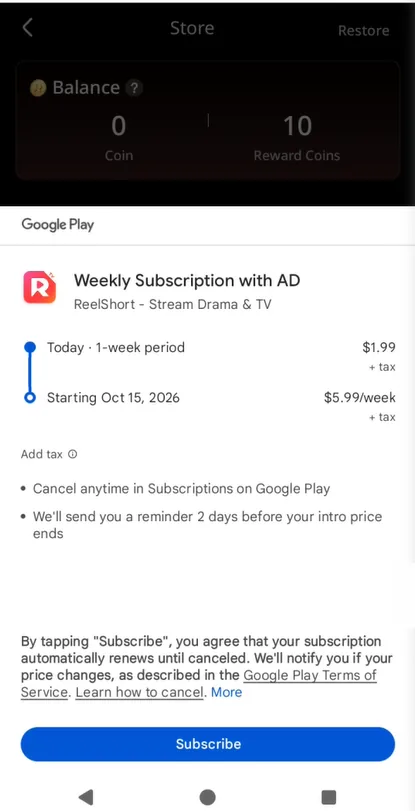
If a charge lands after a confirmed cancellation, this screenshot is the difference between an instant resolution and a multi-week dispute. It costs one second to take while you are already on the screen.
If the charge still lands
If you cancelled, have the confirmation, and the charge still appears: this is no longer a settings problem and no amount of further cancelling will fix it.
Go to whoever actually took the money:
- Store-billed → request a refund through the store
- Web-checkout or PayPal-billed → the app company or the processor, with your cancellation screenshot attached
- Unrecognised and recurring → ask your bank
A chargeback through your bank is the last resort. It works, it takes weeks, and it can cost you the ability to use the payment method afterwards — so exhaust the direct route first, and go in with your cancellation screenshot.
Our cancellation and refund guide covers the store-specific mechanics and the refund window.
One case this page cannot fix, and that gets described as a cancellation failure when it is not one: the subscription was bought before anyone signed in, so it sits on a guest account the app no longer surfaces. Our guest-account guide covers why that happens and what can still be recovered.
Where our testing breaks down
- We have not been charged twice ourselves. Everything above about cancellation mechanics comes from the apps’ own published terms, the store flows, and one web checkout we verified directly. The “users report” items are reported experiences, not our own, and we have marked them as such.
- We have only verified ReelShort’s web checkout. Other apps in this category may run one too — we simply did not test them, so we do not claim they do.
- PayPal’s exact menu labels vary by app version and region. The route we describe (Settings → Payments → automatic payments or saved merchants) is the standard path, but PayPal rearranges its interface regularly.
- App-store pre-authorisation holds are not double charges. A pending hold up to two days before renewal can appear after you cancel. Check whether it is a hold or a settled charge before disputing it.
- Prices and billing routes change. The routes described here were current in October 2026; this category changes its checkout flow more often than it changes its branding.
Bottom line
The reason people keep getting charged after cancelling is almost never a bug. It is that they cancelled one route while the money went through another.
Identify the descriptor first. apple.com/bill means Apple. GOOGLE* means
the Play Store. A company name you do not recognise means the publisher or a
processor, and the app and the store cannot cancel it for you. PayPal means
PayPal, and only PayPal.
Then screenshot the confirmation while you are still on the screen — the entry staying in the list with an access-until date instead of a billing date is how you know it worked.
Frequently asked questions
Why am I still being charged after cancelling a short drama app subscription?
Usually because the cancellation was done through a different route than the one that took the payment. An Apple charge reads apple.com/bill, a Google Play charge starts with GOOGLE followed by an asterisk, and anything else was billed by the app company or a payment processor directly — possibly under a company name that has nothing to do with the app. Cancelling inside the app does not cancel a web-checkout subscription, and cancelling on the developer website does not cancel a store subscription.
How do I find out who charged me?
Look at the descriptor on your bank or card statement, not the app name. Apple uses apple.com/bill. Google Play uses a description starting with GOOGLE followed by an asterisk and then the publisher name. Anything else is the app company or a payment processor, and the descriptor may be a company name unrelated to the app you subscribed to.
I cancelled on the app website but PayPal still charged me. Why?
Because the website cancellation and the PayPal authorisation are two separate records. If you signed up through PayPal, the live authorisation sits in your PayPal account under automatic payments, not on the developer site. Cancelling there does not touch it. You need to cancel the automatic payment in PayPal itself: Settings, then Payments, then Manage automatic payments or Manage saved merchants, find the merchant, and cancel it.
Will a refund work if I was double charged?
It depends entirely on who took the money, and the route differs. Store-billed purchases can be refunded through the store. A web-checkout or PayPal purchase has to go through the app company or the payment processor, and neither is obliged to act quickly. A chargeback through your bank is the last resort and takes weeks. Screenshot the cancellation confirmation as soon as you have it — that is the evidence the refund or dispute process will ask for.
The statement shows a company name I have never heard of. Is that fraud?
Not necessarily. App publishers of this category frequently operate through separate shell or regional companies, so the descriptor is often a legal entity with no connection to the brand name in your app drawer. That is not by itself evidence of fraud. Check whether the charge is recurring and whether it matches a subscription you meant to cancel before assuming the worst — and if you cannot match it at all, ask your bank rather than the app.
This guide covers one question about ReelShort. For pricing, the free tier and what it is actually like to use, see our ReelShort full review.